
Setup
This guide covers the normal setup path for FL Studio, the controller script, the local fls-pilot server, and MCP clients.
1. Create Virtual MIDI Ports
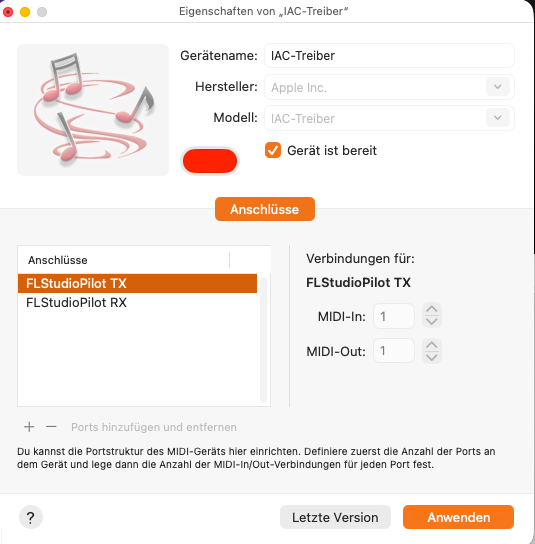
Create two virtual MIDI ports named exactly:
FLStudioPilot RXFLStudioPilot TX
On Windows, use loopMIDI — for the two virtual MIDI ports (download). On macOS, use the built-in IAC Driver.
2. Install fls-pilot
Default editable installation:
git clone https://github.com/thunderdew-dawn/fls-pilot
cd fls-pilot
Optional Requirements (Windows): - ffmpeg on PATH (for MP3 analysis)
Windows:
scripts\install_windows.bat
macOS:
chmod +x scripts/install_macos.sh
./scripts/install_macos.sh
The installer copies the FL Studio controller script, installs the Python
server into .venv, checks the MIDI ports, and installs the Piano Roll
MCP_Apply script.
For a global CLI install, use --pipx:
./scripts/install_macos.sh --pipx
3. Configure FL Studio
Open Options > MIDI Settings and configure both ports with the same FL Studio port number.
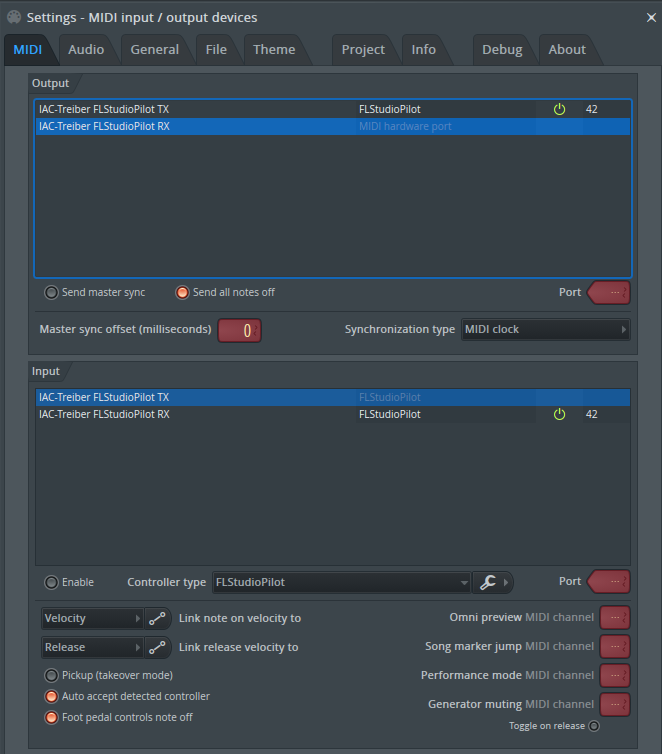
Use this setup:
| FL Studio list | Device | Required setting |
|---|---|---|
| Input | FLStudioPilot RX |
Enable, Controller type FLStudioPilot, Port 42 |
| Output | FLStudioPilot TX |
Enable, Port 42 |
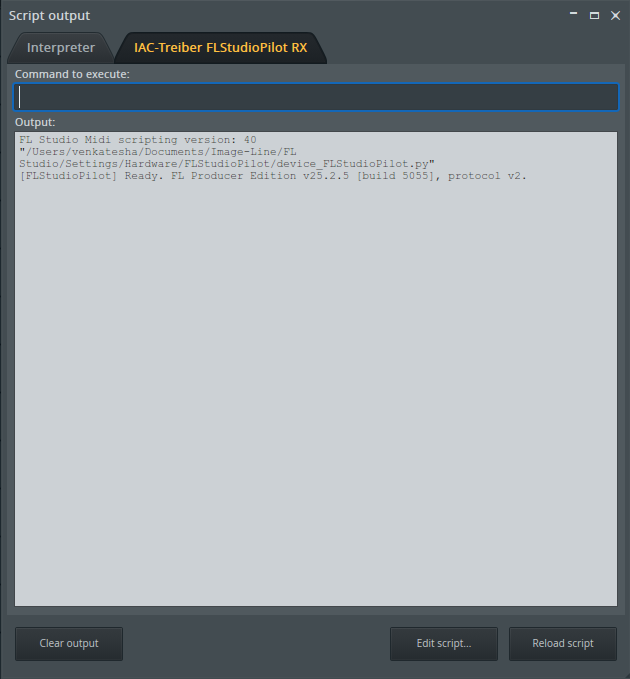
Then open View > Script output and confirm the controller is ready.
4. Open Control Center
Recommended first-run command:
Windows:
.venv\Scripts\fls-pilot-control-center --open
macOS:
.venv/bin/fls-pilot-control-center --open
If installed with pipx, run:
fls-pilot-control-center --open
Control Center stays read-only against the FL Studio project while it checks the environment and displays the correct MCP client snippets.
5. Connect an MCP Client
For stdio clients such as Claude Desktop or Cursor, configure the fls-pilot
command and set FLS_PILOT_TRANSPORT=tcp when using the daemon.
For ChatGPT Desktop, start the SSE server from Control Center and use the
displayed http://localhost:<port>/sse URL.
6. Arm Piano Roll Writes
Only composition tools need the Piano Roll bridge. Open the Piano Roll, choose the script menu, and run MCP_Apply once per FL Studio session.
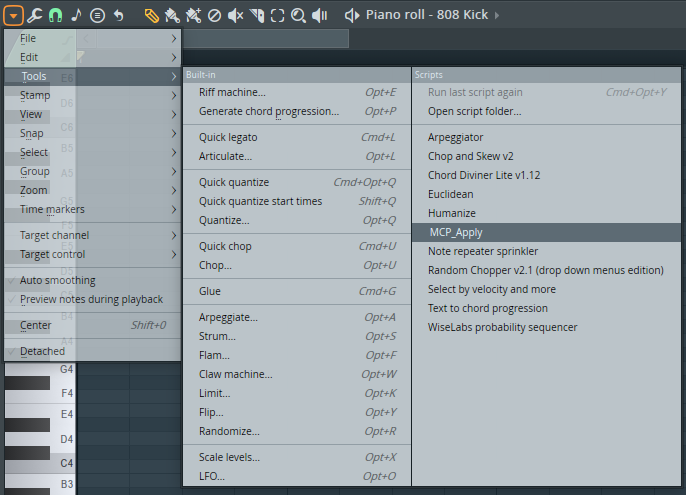
Read-only workflows such as Mix Review, Routing Audit, Project Health, and Preflight do not require this step.
Troubleshooting
| Symptom | Fix |
|---|---|
| MIDI ports are not detected | Recreate the ports with the exact names FLStudioPilot RX and FLStudioPilot TX. |
| No ready message in Script output | Confirm the controller type is FLStudioPilot, then restart FL Studio. |
| MCP client cannot reach FL Studio | Open Control Center, check daemon/SSE status, and verify fl_transport(action="ping"). |
| Note writing does nothing | Run MCP_Apply once from the Piano Roll script menu in the current FL session. |
| Audio analysis tools are unavailable | Install optional extras with pip install -e ".[audio]". |